Posts

Using taco to create Ionic projects for the Windows platform
Image
Recently Microsoft released Tools for Apache Cordova Command Line Interface (TACO CLI), by using TACO, you can quickly start building awesome Apache Cordova apps really and leave all the plumbing of the different platforms dependencies, plugins, etc. to the tools to take care of. For example the following few commands create a cordova project based on the ionic base template, add the android platform to the project, install the platform requirements, build the app, and run it in the emulator: $ taco create sampleApp --template https://github.com/driftyco/ionic-app-base $ cd sampleApp $ taco platform add android $ taco install-reqs android $ taco build android $ taco emulate android Check the TACO home page of for installation instructions and more information http://taco.tools/ . I ran into a problem when i created a new project based on the ionic base template and tried to run it on a windows 8.1 emulator, to reproduce the issue use the following taco commands to cr...
bower.config in VS 2015 (RTM): packages versions are not loading correctly

Image
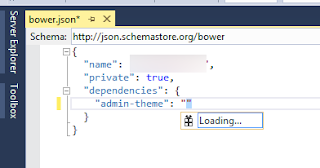
While working the VS 2015 RTM, I found that IntelliSense in bower.config file cannot load the versions of the packages. the problem is reported here , and the solution that worked for me is to install the git tools and run the command git config --global url."http://".insteadOf "git://" then restarting VS. this will hopefully solve the problem.

Portable Class Library Projects and MVVM Light

Image
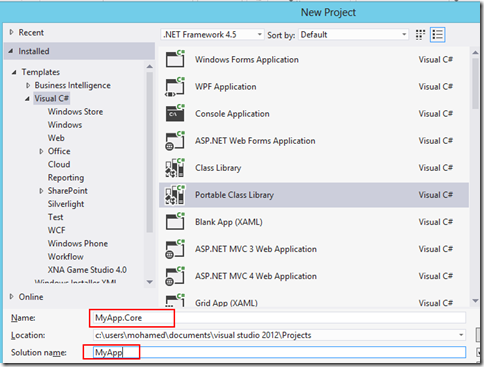
With Portable Class Library Projects you can create a single library that can target different platforms (e.g. Windows Phone, .Net, Windows Store Apps). For most of the modern apps it’s kind of mandatory to use the MVVM pattern, a famous MVVM library is Laurent Bugnion MVVM Light library. In this post we will walk through the steps needed to create a Portable Class Library that uses the MVVM Light library and targets the Windows Phone 8 and .Net for Windows Store Apps frameworks. I will be using Visual Studio 2012 with Update 3. - Let’s create a new Portable Class Library project and name it MyApp.Core, the solution name will be MyApp - We will target the Windows Phone 8 and .Net for Windows Store Apps - We will create two applications, the first is a Windows Store Blank Application named MyApp.Win8 and the second is a Windows Phone 8 named MyApp.WP8 - We will add a reference to the Portable Class Library Project MyApp.Core to the Windows Store Project and the...

Video Recordings of Our Latest Event

Here are the links for the sessions recordings for our last community event that was held in Khobar: - Introduction to SQL Server Integration Services (SSIS) - Windows 8 Development Jumpstart - Kinect Development

DevLifeStyle February 2013 Sessions Recordings

Recordings for our last DevLifeStyle event Connecting Window 8 Store Applications to the Cloud BizTalk Server 2013 Next generation user interaction devices Introduction to NoSQL

Windows Azure takes over Amazon Cloud

Microsoft Windows Azure takes over Amazon's cloud in performance test, read the full story here http://www.networkworld.com/news/2013/021913-azure-aws-266831.html?hpg1=bn Info graphic on the result http://www.nasuni.com/blog/193-comparing_cloud_storage_providers_in

DevLifeStyle VS2012 Launch Event

here are the recordings from our last event. Windows Azure Development in Visual Studio 2012 Modern App Lifecycle Management with Visual Studio 2012   Async/Parallel Programming in .NET 4.5 and Visual Studio 2012   Developing Windows 8 Store Applications using Visual Studio 2012

DevLifeStyle March 2012 Event: Sessions Recordings

Here are the sessions recordings for our last event Building High Performance Applications with .NET 4.5: Part1 , Part2 Kinect for Windows Developing Applications for Windows 8

Windows 8 Session

In our next DevLifeStyle Community event I will be presenting a session on Windows 8. you can register here http://dlsfeb2012.eventbrite.com/

Silverlight 5 P-Invoke: Using Kinect SDK from Silverlight

Image
Away from all the discussions about whether Silverlight is dead or not, The Silverlight 5 RC contains the previously announced P-Invoke feature which enables you to call Win32 style APIs from a trusted Silverlight application. There are some attempts to use Kinect from Silverlight ( here ) but this was before MS released the official SDK. we will use Silverlight 5 P-Invoke feature to call the Kinect SDK APIs. P-Invoke in Silverlight works just like P-Invoke on the desktop. you use the DllImport attribute to import the APIs and you declare in your code the dependent types (Enums, structs, etc.) [ DllImport ( "MSRKINECTNUI.DLL" )]        private static extern HRESULT NuiInitialize( uint dwFlags); I tried to keep the classes and methods in library identical to the ones in the official SDK. I implemented only a couple of the available APIs (with the help of the Coding4Fun Kinect Toolkit and Reflector). To test the library we will create a simple applicati...

Surface 2.0 SDK Released

Image
The long awaited Surface 2.0 SDK has been just released. to get started go to the new Surface Developer Center and download the SDK. Once downloaded and installed, start VS2010, you will find the Surface 2.0 project templates available Let’s create a sample application, I will create a simple twitter client (hopefully before scottgu creates it) let’s name it TwittSurf Once we created the project you will have the same project structure as you have in the Surface 1.0 version, let’s create our UI < s : SurfaceWindow x : Class ="TwittSurf.SurfaceWindow1"     xmlns ="http://schemas.microsoft.com/winfx/2006/xaml/presentation"     xmlns : x ="http://schemas.microsoft.com/winfx/2006/xaml"     xmlns : s ="http://schemas.microsoft.com/surface/2008"     Title ="TwittSurf"     Loaded ="SurfaceWindow_Loaded" >      < Grid >          < s : ScatterView >                  < s : ScatterViewItem...

Portable Library Tools

Image
With the introduction of Windows Phone 7.0 a new opportunity emerged for Silverlight developers, this new platform uses Silverlight (a version of Silverlight 3.0) as the main framework to build applications on the phone. When building applications for Silverlight and WP7 you will find that you can reuse some of the code across the two platforms, Linked source files were used to share code between WP7 and Silverlight projects along with the use of compilation directives. Microsoft introduced a new way to create code that targets multiple platforms, it’s a Visual Studio Add-In called Portable Library Tools (Available here ) Portable Library Tools is a new Visual Studio add-in from Microsoft that enables you to create C# and Visual Basic libraries that run on a variety of .NET-based platforms without recompilation. In this post we are going to build a sample application for WP7 and Silverlight that uses the Portable Class Library Tools. We will create a CustomersExplorer appl...